• Published on

    Easy POTA

    The low-contrast developer POTA is excellent for getting normal contrast results and a wide dynamic range when using inherently high-contrast films such as Tech Pan and (nowadays in my case) Washi-S. However it is a bit awkward to use as you need to make it up and let it cool each time, then use it immediately or it will go off.
    The components of the working solution are 30 g/l Sodium sulphite and 1.5 g/l Phenidone. Normally you dissolve the sulphite in hot water, then dissolve the Phenidone in the same solution, and cool it before use. The Phenidone is always reluctant to dissolve and the usual advice is not to worry about a bit being left undissolved, which I always think is a bit untidy.
    What I do know, though, is that Sodium sulphite solution is reasonably stable on its own, and Phenidone dissolves easily in alcohol (ethanol) and seems to keep at least for months as a 15g/l solution in ethanol. I have a licence to use small quantities of "Industrial Denatured Alcohol" as it is called in the UK, which is what I use for this. It is better than the regular domestic methylated spirit as it doesn't have a dye or pyridine (smell) added, and it is reasonably dry - the domestic spirit has some water in it. I haven't tried either domestic methylated spirit for this developer, or isopropanol, but they might work. Further experiment needed there.

    Here is my experimental formula based on all this:
    Make two separate stock solutions -
    Solution A is 150 g/l Sodium sulphite (anhydrous) in water
    Solution B is 15 g/l Phenidone in alcohol.
    Both of these should keep for a few months and possibly more.

    To make a working solution, for each 100 ml ...

    Take 70 ml water at about 25°C
    Add 20 ml of A and mix well
    Add 10 ml of B slowly, mixing as you go.

    The result should be a clear pale yellow liquid, or maybe slightly cloudy which is still OK. It should also be at about 20°C, if not, next time adjust the temperature of the starting water. Use immediately.
    Typical development time is 12 minutes with normal intermittent agitation in a tank, adjust to suit your own conditions.
  • Published on

    Seeing in the Dark

    ​I frequently find myself wanting to work on panchromatic film in the darkroom. I may need to re-spool it, cut it to a smaller size, process it by hand, and so on. In the past I have had to do this entirely by feel, which is possible but often tricky and frustrating. Photographer Christopher Creighton remarked that he uses an infra-red (IR) viewer to do such work. What a brilliant idea! The particular viewer that he uses is one originally made as an accessory to a video game, and it’s only occasionally available used on eBay in the UK; and quite expensive too. So I thought I had better start from scratch and see what I could find.

    Illumination
    We want illumination that doesn’t fog the film, but will register on the viewing apparatus. To plan that, we need at least an approximate understanding of the spectral sensitivities of film and viewer, and the emission spectrum of the illumination.
    Picture
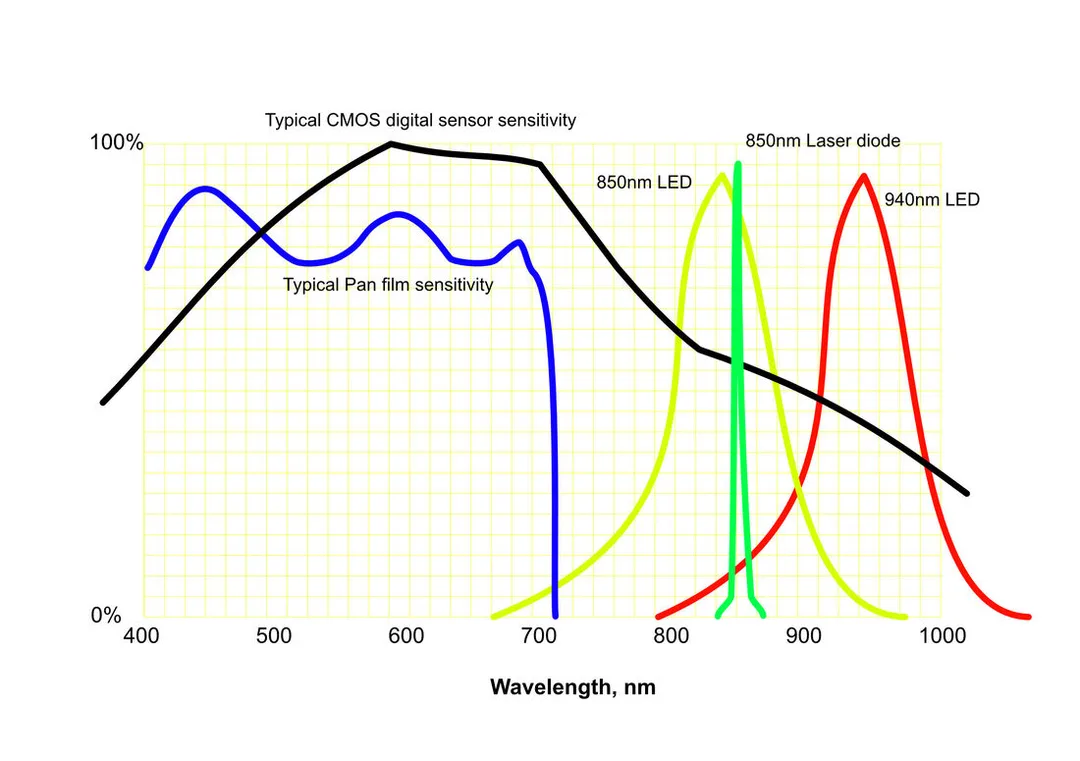
    ​The graph sketches the possible relations between the components of the IR viewing system. The range of human vision is approximately 400-700 nm (nanometres) and panchromatic film (blue line) matches that reasonably closely. The near infra-red (IR) extends from 700 to about 1200 nm, which is the region we want to use. The sensor in the viewer is likely to be CMOS (black line), which has good though declining sensitivity in this region. In the graph are the outputs of possible IR illumination. What we need is plenty of light emission in the region where the viewer’s sensor can operate, but none in the region where the film we are working with is sensitive, because that would fog the film. The commonest IR illuminators work at 850nm, but as you can see (yellow line) there is some overlap with the film sensitivity around 700 nm, so the film will be fogged to some extent. There are three possible solutions:
    • 850 nm laser diode, as it has a much narrower distribution and doesn’t get near the film
    • 940 nm LED which has a wide distribution but doesn’t overlap the film.
    • 850 nm LED plus a sharp cut-off filter to remove the shorter wavelengths (a part of the left side of the curve).
    Of these the cheapest is the 940 nm LED solution.

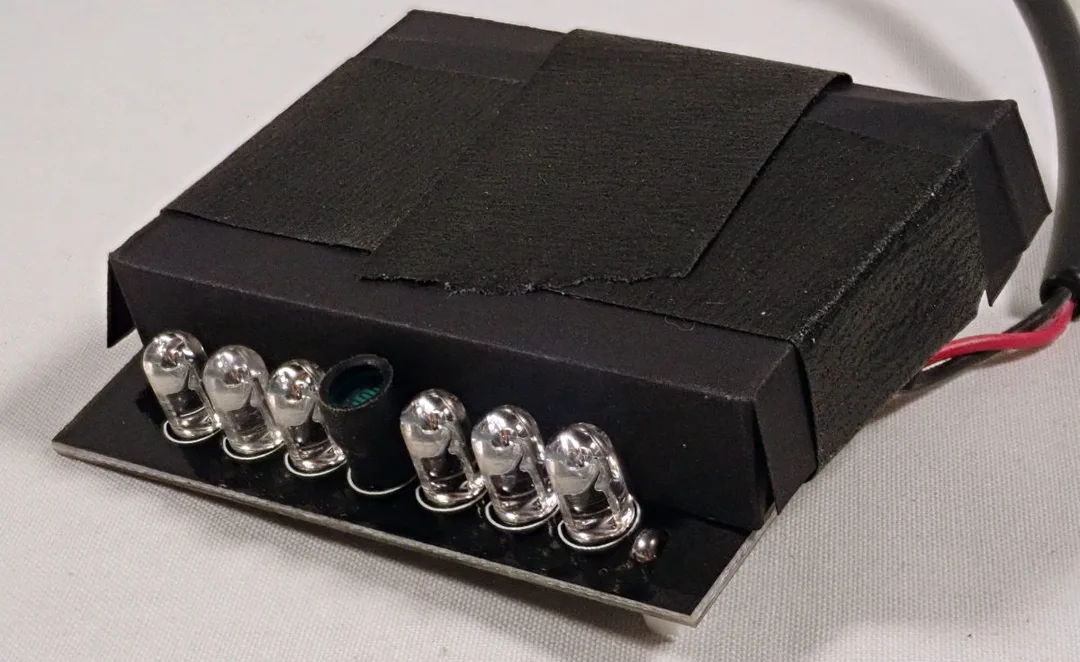
    This is all a little simplified and a small amount of unwanted light may still exist, so the aim must also to be to limit the brightness of the illumination, which will maximise the length of time that film can be exposed before generating significant fog. The test I do is to try to get about the right brightness of the “lamp” (a little board with an array of 940 nm LEDs), as seen by my viewer, then leave a piece of film face up in the darkroom for 30 minutes with the IR lamp on, and a penny on the film so that fogging is distinguishable from any inherent fog from the film and processing. My LED board is for 12v DC, has 48 LEDs working at 940 nm, and is much too bright. However you don’t have to drive it at 12v, it will work with anything from about 7v upwards – 9v is convenient as suitable power supplies are common. I also mask off most of the LEDs leaving just 6 visible. I place this a metre or so above the workbench, reflecting off the white ceiling, and a 30-minute exposure doesn’t fog the film.
    Picture
    The 940 nm illuminator masked down with some thin black card to show just half a dozen of its 48 LEDs
    I did also try an 850nm laser torch – as above, laser diodes have a much narrower bandwidth than LEDs and so should not emit wavelengths close to the limit of sensitivity of the film. This also worked, not fogging the film in 30 minutes; but it is a more expensive solution and is no better than the 940nm array.
    A further option I didn’t try would be to get a piece of sharp-cut IR filter to subtract the tail of the emission from 850nm diodes. This material does exist, but so far I have only found suppliers of industrial quantities, with minimum orders which make it uneconomic.

    Viewer
    Thinking about the viewer, there are quite a few requirements for something that will actually be usable:
    • Adequate sensitivity to the IR light produced by the illuminator. Most viewers have built-in IR lights but they usually work at 850nm, with significant overlap with the sensitivity of film. If so, they will need to be switched off or covered, with alternative lighting supplied separately.
    • It should be head-mounted so that both hands are free for work.
    • There should not be significant leakage of light from the screen when in use. These devices have an optical system working in IR, a sensor, and little video screen to display the scene using visible light. This visible light would fog the film if it escaped from the goggles in significant quantity.
    • It should not magnify the view; most of these viewers (also called goggles or night vision binoculars) are intended for hunting or paintballing, working at a distance from the subject. In this case we are working close up and need a wide-angle view.
    • It must be able to focus close enough to the subject (around 0.5 m).
    • The electronics should be fast enough that the video doesn’t significantly lag behind real time.
    • If you wear reading glasses, there needs to be enough room for them inside the rubber surround.
    • Ideally the viewer would have two channels for the two eyes (stereo), so you could see depth. In practice we have to do without this, as in a sensible price range all the products I have found only have mono IR vision, even if they are styled as, or called, binoculars. The viewing screen can be watched by both eyes, but is mono.
    Picture
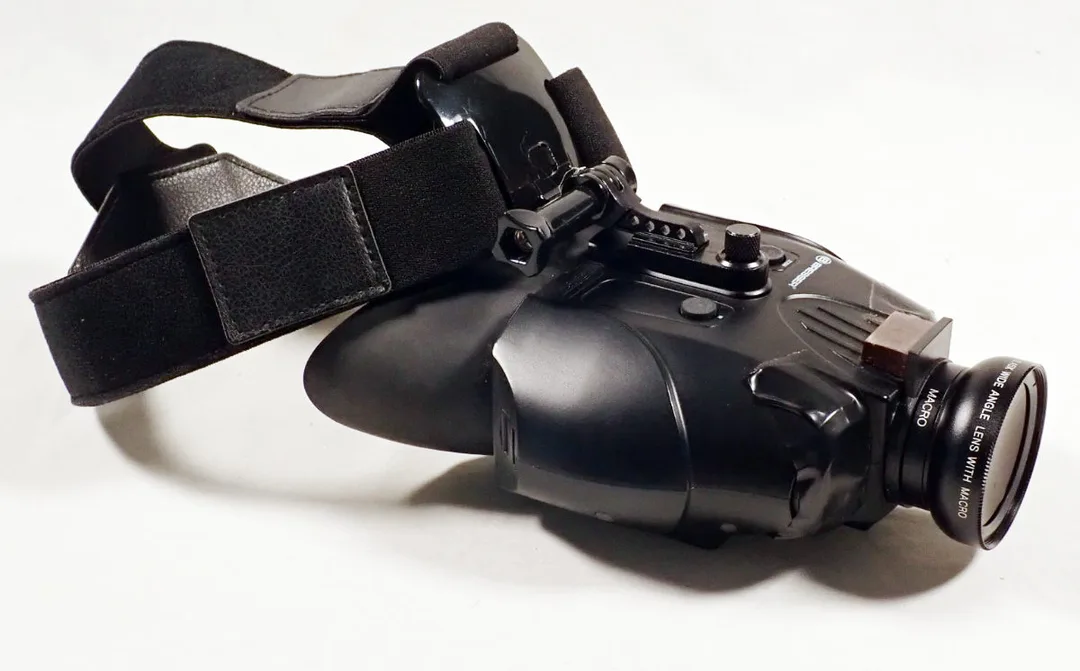
    The Bresser viewer, with the wide angle attachment in place and the 850 nm lights covered.
    On that basis I found a viewer, binocular so-called but not really, made by a German firm called Bresser. It is one of the relatively few that don’t magnify, and there is almost no video lag. It is made for 850 nm and has two IR lights. It works in normal light too, and at first I thought that I just needed to turn off the built-in IR lights to use it with a separate illuminator. However that’s not the case; the IR switch not only turns on the lights, but also changes the settings of the sensor. To achieve IR sensitivity you have to turn on the built-in IR illumination, and for this application mask the lights with something opaque.

    I made other adaptations too. It is 1x magnification, and focuses easily as close as necessary. The width of the scene is still insufficient though, so I bought a wide-angle adaptor x0.45, made to clip onto a mobile phone. I cut off most of the spring clip, and glued the part that the lens screws into, to the front of the Bresser. The Bresser’s rubber hood is too small to accommodate normal reading glasses, but the very narrow “pocket” ones do fit. I had to mask off one of the lenses of the reading glasses to avoid double vision. I did try a sheet of plastic Fresnel magnifier instead, but prefer the glasses.

    IR light is safe in these quantities, there is plenty of it in ordinary daylight. IR torch lasers, like other lasers, need to be treated with care – don’t look into the beam. High-power IR lasers should not be used, and anyway are quite unnecessary for this purpose.

    Costs
    I’m trying to keep the costs down of course. I have spent, in late 2022:
    • Bresser viewer £100 second-hand – would have been £175-£205 if I had bought new.
      www.bresseruk.com Product code 1877495.

    ​So for under £150 I have a system that allows me to work for a good length of time manipulating panchromatic film, including aerial survey film with extended red sensitivity, and see what I’m doing. By the way, do not use this with actual IR film which would certainly be fogged. On the other hand I don’t see any reason why I couldn’t use it with normal colour negative and transparency materials.
  • Published on

    Cirkut Gear Selector

    There seem to be continuing online questions about how to select the correct gears for Cirkut cameras, depending on focal length and focal distance.
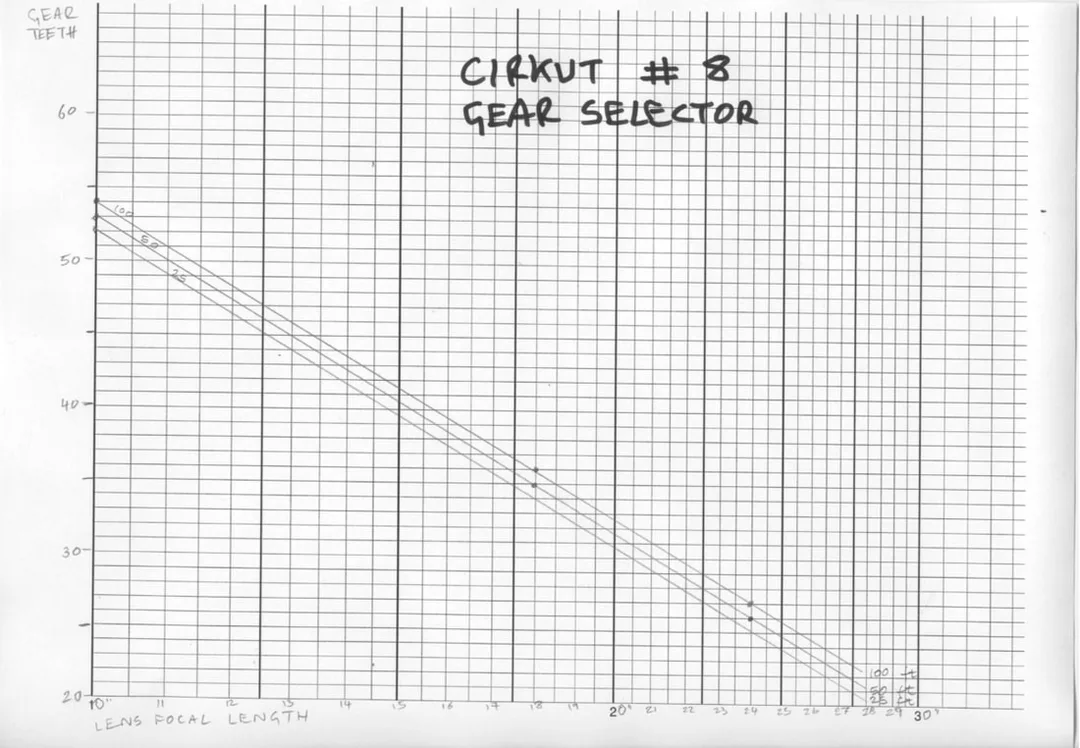
    ​By inspecting the scales on the bed of my Cirkut #8, I find that there is a simple straight-line logarithmic chart for each distance and all focal lengths.
    Picture
    Note that the x-axis scale is logarithmic and the y-axis is linear. However there is no need to worry about any of that. Choose your lens focal length (in inches) along the x-axis, then the y-axis shows the tooth count of the required gear at 25, 50 or 100 ft. I guess infinity uses the 100 ft setting. A larger PDF version is downloadable from the link below.
    It would be a useful exercise to check the data for other Cirkut models, but I don't have those so leave it to others - who may hopefully to publish the results!
    Using modern gears
    There is much debate and concern in various online forums about how to make or find new gears for a Cirkut camera which doesn't have a full set. The industrial standards for gears have changed over the years, in particular the use of the Module System which has largely replaced the earlier Diametral Pitch standard, and the Pressure Angle which for original Cirkut gears was 14.5° and for standard off the shelf gears is usually now 20°. How much of all this matters? Remember we are enjoined in the instructions only to half-engage the gears anyway, so we are not talking about a high-performance gearbox.
    I have made and tested modern gears for my Cirkut #8 outfit, and concluded that it is perfectly OK to use new off the shelf gears, all you will need to do is make the shaft on which they rotate, which screws into the motor of the camera. The specification is Mod 0.8 brass spur gears of whatever tooth count you need. Or even plastic ones if you don't mind the appearance. The screw on the end of the shaft is #8 UNC, so you will need a die for cutting that.
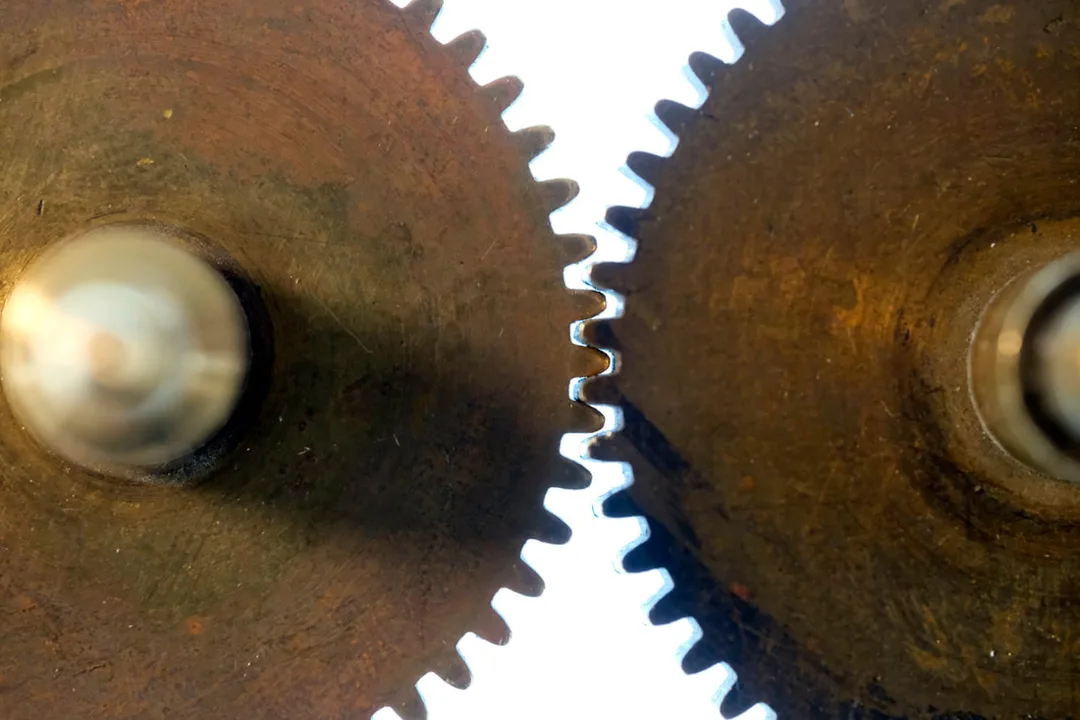
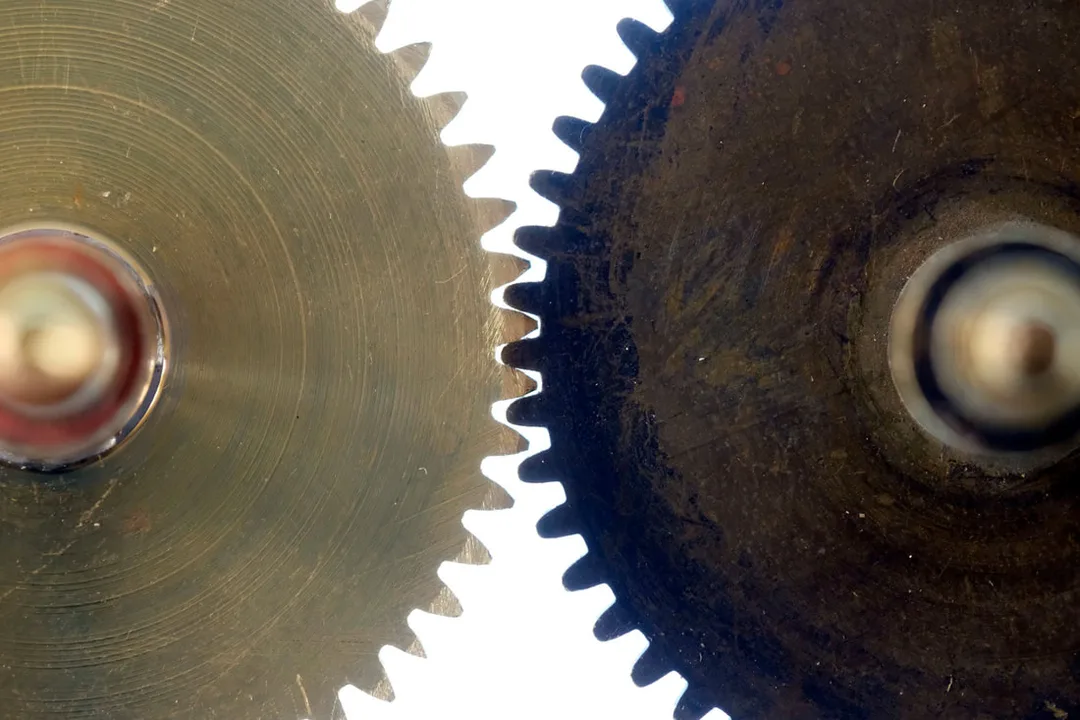
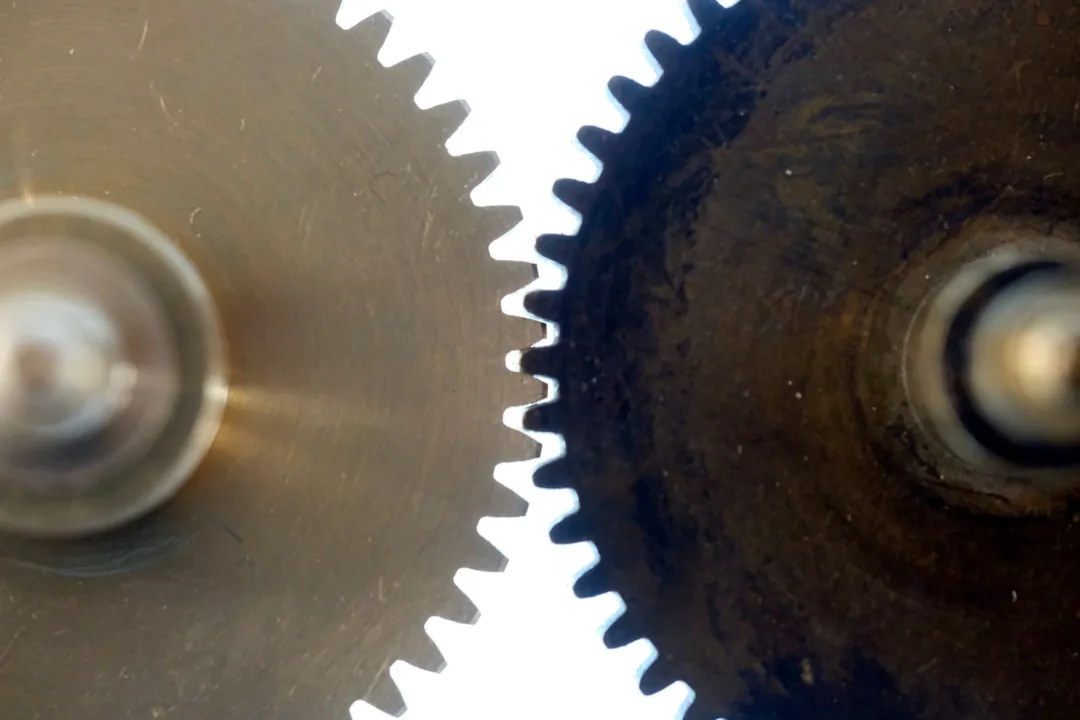
    I have used both commercial modern gears and home-made ones (which are a bit less precise), and both work. The illustrations show three different gears on the left, engaged with an original Cirkut gear on the right.
    Picture
    Two original Cirkut gears
    Picture
    Home-made + Cirkut gears
    Picture
    Commercial + Cirkut gears
    Gear Design
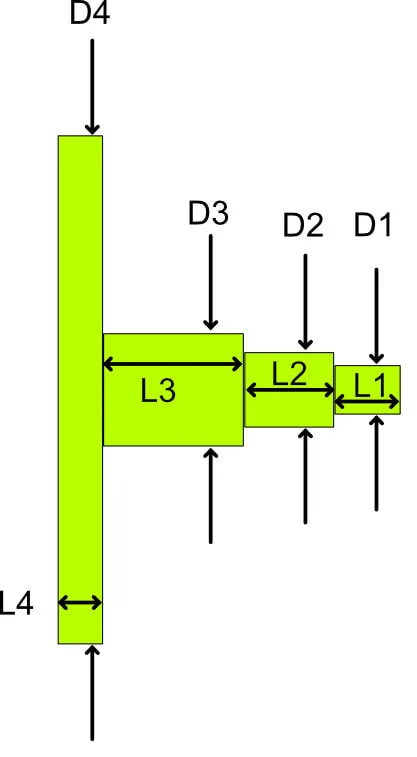
    If you don't have a gear to use as a model, here is a basic drawing. Any small lathe will be suitable.
    Picture
    Dimensions:
    D1 - turn to 4.1mm diameter then form a screw thread #8 UNC over the full length.
    L1 - 5.5mm
    D2 - 6.3mm nominal, but should be a sliding fit inside the gear socket of your motor.
    L2 - 7.3mm
    ​D3 - 9.5mm in the original, but can also be any convenient larger diameter. The right face of this section positions the gear the correct distance below the motor.
    L3 - 11.5mm in the original but see below
    D4 - this is the gear itself, so the diameter will vary by tooth count. Use Module 0.8, PA20° (which is the default)
    L4 - 3.75mm in the original.

    L4 is the thickness of the actual gear blank, and the gear you buy or make may be different, typically thicker. 3 - 5mm thickness should be no problem, if more it is probably best to face it thinner. The shaft and gear will be made separately, so the shaft will have a projection to the left to fit the bore of the gear, typically 6mm. If the gear comes with a boss, the diameter of the boss will displace a good part of D3/L3. If there is no boss, be extra careful to get the gear truly square to the shaft when you attach it. In the original I think the shaft is a press fit to the gear, with the left end peened over to be sure. I find that with a good fit, soft solder or a modern adhesive are both fine - the gear is not highly stressed in service.
    The key to getting the gear at the right position against the big toothed wheel of the tripod head is getting the total of L3+L4 correct. These dimensions are as original for my Cirkut #8 but I have another original Cirkut gear whose shaft was about 9.5mm longer before I cut it down to fit this camera, so it's clear that there is more than one standard size.
  • Published on

    Washi-S Film

    Washi-S Development Trials
    Having a need for a 35mm film suitable for testing several quite old cameras, I though I would try Washi-S. It is a specialist emulsion, fine grained, sharp and fairly slow, intended for recording optical sound-tracks for the cinema. It's a 50 ISO film, a bit like the old Kodak Tech Pan but more tractable, supposedly, and it is Pan/Ortho (limited red sensitivity). For cameras of this age - around the 1940s and earlier - the speed should be compatible and the high contrast could compensate for a rather low-contrast lens. That's the idea, anyway. I got mine from Analogue Wonderland.
    Reading up on it, everyone agrees that for pictorial purposes the contrast needs to be tamed, and of course there are many opinions on the best way to develop it. There is wide (but not universal) support for Stand Development, using a whole range of possible developers, each with its own enthusiastic supporters and detractors. In the hope that these are perfectionists, I did trials with what I had to hand!

    Method – dilute developer, vigorous agitation at the start, then none. Tanks sat in a bowl of water at 20°C to hold temperature and discourage convection. For the trial I exposed three short lengths of the film in a Nikon FE2 with its 55 micro lens, so the sharpness and the exposure should be assured. Scanned with Vue-Scan, multi-exposure on, 3200dpi.

    Trial 1
    Subject – the S side of the house in full December sun. Contrasty conditions.
    Developers - Rodinal 1:100, PC-TEA 1:80, Ilfotec HC 1:100 (1+3 then 1+24). 45 min.
    Results:
    Rodinal – no image, just some faint brownish fog at the hyper-exposed film end.
    PC-TEA – Best result; a contrasty neg, bright and sharp. See my August 2018 blog for more on PC-TEA.
    Ilfotec HC – nearly as good as PC-TEA but more contrast, and significant burnout in highlights.
    Conclusion: PC-TEA is the most promising, but has too much contrast. Overdeveloped.

    Trial 2
    Developer - PC-TEA again, but 1:100 this time and less than half the time.
    Subject – various test cards, interior shots. Also two exteriors, in dull even misty conditions, far lower in contrast that the previous sunny ones.
    Developer – PC-TEA 1:100, 20min stand development at 20°C.

    Scanning as before, though the multi-exposure made no difference this time. The positive scans of the test cards show that the darkest 4 blacks out of 19 are the same black, so not perfect for shadow detail, the other patches are well distinguished. No grain, generally smooth tones without development artefacts, though a few small roundish fuzzy areas of lighter tone (in the positive). The scans mostly need a modest amount of lightening in post, but otherwise look good.

    Conclusion
    The result of Trial 2 is good enough to try on a real old camera (the Nikon FE2 doesn't count as one of the old ones, I used that for its reliable shutter and metering, and good lens.) I have been restoring a 1928 QRS Kamra, reported here amongst my other restoration projects, and used this method for the final tests.
    Picture
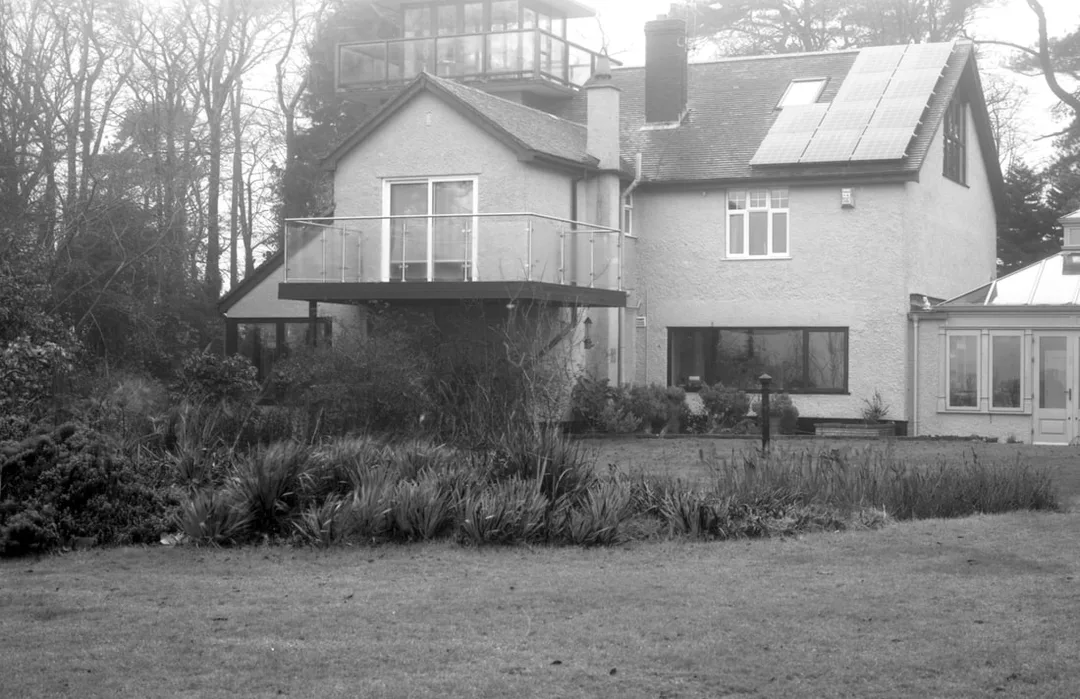
    House on a misty December day.
    More on Developing Washi-S

    I have recently had good success, better than the previous methods described, using the POTA formula originally devised for processing Kodak Technical Pan. POTA is very simple, but doesn't keep, it should be used immediately after it is put together. However it is very simple to make:
    The formula is 30 g/l Sodium sulphite (anh.), 1.5 g/l phenidone. The phenidone is not keen to dissolve in water, so I make a separate solution in Industrial Methylated Spirit (= Industrial Denatured Alcohol). It might also work in other lower alcohols such as methanol or isopropanol, perhaps also in ordinary domestic methylated spirit, though that tends to have significant water contamination,. I haven't tried any of those myself.
    So I make a solution of phenidone in the alcohol, 15 g/l. it dissolves easily and keeps at least for weeks in a dark glass bottle. My procedure for 1 film in a tank requiring 330ml of developer is:
    • Put 200ml of tap-water at about 30°C in a beaker, on a magnetic stirrer, add 10g sodium sulphite and wait for it to dissolve. [obviously you could also stir by hand].
    • Add 33ml of the phenidone/alcohol solution, slowly with stirring - it should stay clear, and will be yellowish. If it goes cloudy the phenidone solution has probably gone off.
    • Top up with colder water to 330ml, aiming to get the temperature down to about 25°C which is a suitable temperature for processing.
    • ​Develop 15 minutes using intermittent agitation, fix and wash as usual.

    See my June 2023 post for more on this!
  • Published on

    Working with a Bermpohl

    Picture
    The Bermpohl Naturfarbenkamera. Or in English, "Natural Colour Camera". This is the 9x12 model, made in Germany, probably in 1932. Bermpohl was a leading manufacturer of tri-colour process cameras using panchromatic black & white plates with RGB filters (Red - Green - Blue ) to make a colour photograph. The lens is a Plaubel Anticomar 21 cm f/4.2 in a Compound shutter - not the original spec, which would have been a Meyer Doppel Plasmat f/4. It came with a tiny booklet advertising photography books, magazines and courses, many by Hans Windisch. The stamp on the back is from a dealer Joh. Güber of Osnabrück - probably it originally came from there.

    It seems to have had little use, the external condition is beautiful. It is very heavy at 12.5lb / 5.7kg, made mostly of teak and all the screw heads line up! Despite the solidity it needs to be treated with care, as the internal alignments must not be deranged. There are two large (3/8" W) tripod holes on each of two faces, though its natural orientation is portrait format, and landscape use is decidedly awkward. Polished wood covers for two plate positions, a groundglass focusing screen for the third. The bellows is green, and looks more or less new (but I think is original).

    Picture
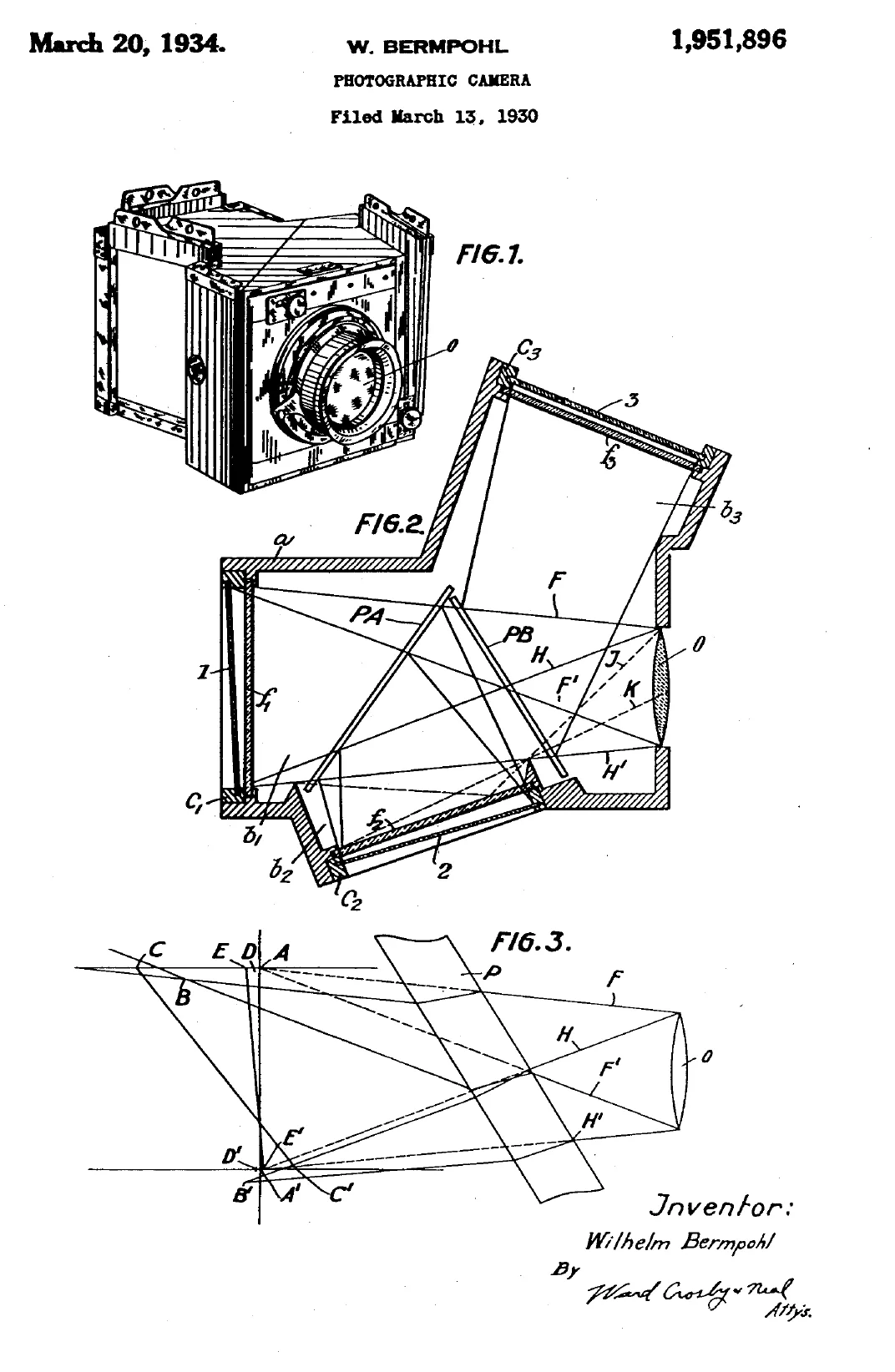
    The patent which I downloaded shows how complicated the optical design actually is, to avoid stray illumination of the R plate by deliberate reflection from filter surfaces, and the variable thickness of the filters and mirrors to fine tune the magnification and rectilinearity so it’s the same everywhere. Inside you can see there are means of adjusting the mirrors to fine tune, which should not be attempted. The actual camera is fairly close to the patent, but not the same. There is an extra pane of plain glass parallel to mirror PB (in the patent) and closer to the blue plate, there is a plain window just behind the red filter, and the design no longer has the slight tilts of plates 1 and 2. The filters have 1, 2 and 3 flags at the edge which will make shadows to identify the plates, R=1, G=2, B=3.
    The Anticomar lens is not the original spec, though the FL and aperture are suitable. A Meyer Doppel Plasmat f/4 was usually fitted. The attachment of the Anticomar’s mounting ring is far below Bermpohl standards, and previous screw holes show it to be a replacement. I put a torch inside in the darkroom, and found quite a big light leak around where the lens flange fits to the lensboard. The flange is non-original and not properly fitted, the spigot is several mm smaller than the hole, so no surprise. I found a ring in stock that fits the spigot properly, machined a relief in the wooden lensboard in the lathe using the 4-jaw chuck, so now the lens flange connects light-tight to the panel.

    The focusing rack is quite stiff; it also locks. It’s immediately obvious that the groundglass image is dim, and will need care to set up. The camera is also very heavy and needs a solid tripod, in my case a Gandolfi with its platform.

    If you look through it with all the filters removed, the image at each window is of course dim - it is also far from neutral in colour, being brownish. On closer inspection the mirror nearer the lens transmits orange (minus blue), and the one further back transmits green. This is all part of the method of suppressing unwanted internal reflections  - but surely the filters should do that anyway? All this light loss raises quite serious problems; the instructions recommend exposing 25x as long as a simple camera in the same position - my experiments suggest that's optimistic, and around 40x is preferable. For ISO 200 film, that means exposing at about ISO 5.

    I have been making modified darkslides, and working out a suitable exposure and processing regime. The camera came without darkslides, but I had a set of 3 ZI double darkslides which I could fit with some careful wood trimming and insertion of adaptors for sheet film. All that is now sorted, as is the elimination of light leaks and some preliminary trials of exposure.

    Focus: The GG is 4.2mm back from the reference surface, and the film in the (non-original) darkslides is 6.2mm back. The short term fix is to move the lensboard backwards 2mm after focusing.
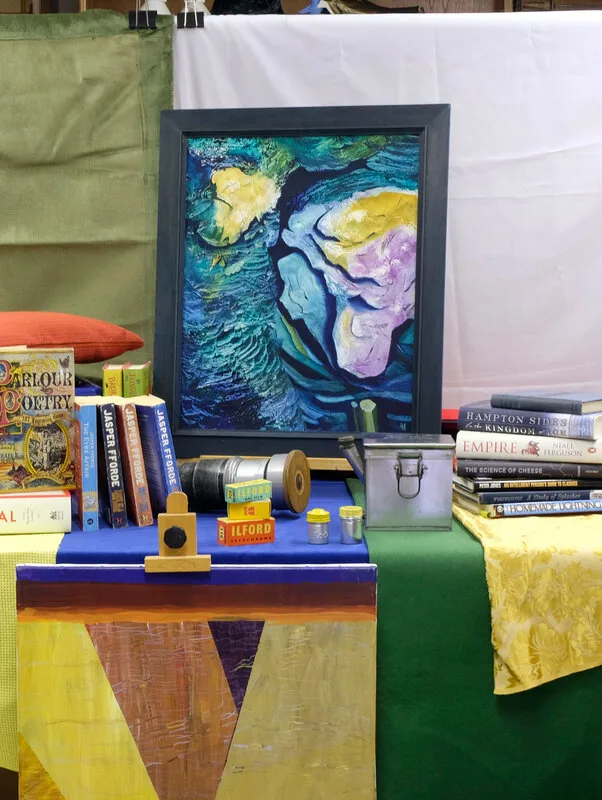
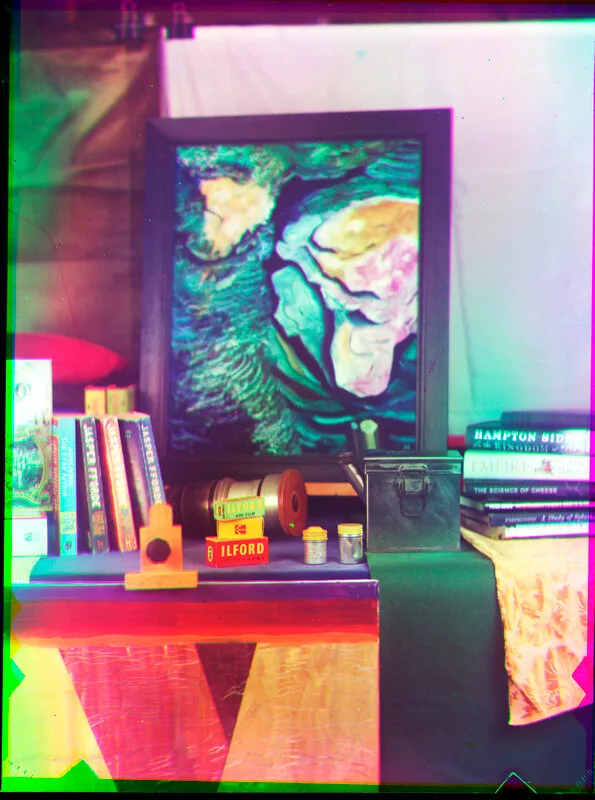
    I set up a scene with assorted coloured articles, to provide a controlled indoor environment. I lit it with the most powerful studio flash I have, x2 in softboxes. With the flash turned up to max, my Gossen Sixtronet flashmeter says f/16 at 32ASA. Prior experiments mean I want to aim for 4ASA. That gives f/5.6 for this setup, which does not give much depth of field. In the end I made two exposures, f/5.6 and f/8. Of the two, the f/8 has better depth, but f/5.6 has considerably better colour, so that’s the one I’m illustrating. There are two pictures shown, one below is taken with the Bermpohl, assembled in Affinity Photo, and the one on the right with a modern digital camera so you can see what it ought to look like. Note that the digital picture was taken with ordinary overhead room light not flash, but from pretty well the same position.


    Picture
    Above - the scene photographed with a modern digital camera
    ​Below - As taken with the Bermpohl and assembled in Affinity Photo, with the edges left in.
    Image description
    There are various defects - the registration of the three negatives isn’t perfect, which seems to be down to the internal alignments of the camera, and the colour rendition is noticeably non-uniform across the scene. That’s partly because the first mirror is not perfect, some of the silvering has suffered a bit of mechanical damage. And the depth of field is insufficient for the depth of the scene.

    Nevertheless, it is all quite encouraging, and begins to show why for a while this approach was quite popular with professionals, mainly for portraiture and advertising. Apparently nearly all Bermpohl’s output went to the USA, mainly to studios that produced luxury advertisements. The three negatives could of course be worked up directly into printing plates.

    I guess the next step will be to go outdoors where exposure will be easier to manage. Choice of location and subject will be tricky; obviously a colourful subject, but it needs to be in a readily accessible space. The camera is so heavy, and despite that I suspect not very robust, that I can’t just chuck it in the back of the car and go looking! I suspect that they were seldom taken from the studio, though I’d think there were bound to have been at least some beach/fashion pictures taken in 1930s California. My trials will be less demanding.
    A note on post-processing:

    The product of each shot is a set of three monochrome negatives recording the primary colours in the scene. These days, they must be scanned and assembled in the computer to produce the colour image required. I use Affinity Photo for this, which does it easily:

    If possible include at least a greyscale in the picture.
    Do the initial scans and flip so all are the right way round, and positive. Preferably scan all three as a single operation and then split them, to get correctly proportioned exposures.
    In Affinity Photo:

    Import the three images as a "live stack" with alignment.
    Copy the three layers of the stack, paste them above the live stack, delete the live stack.
    Make sure you are in RGB mode.
    Select the R layer, go down to Channels, find the R layer’s own channels. Right click the G and B in turn, and clear them. Repeat appropriately for the other two pixel layers.
    Select all 3 pixel layers and change the blend mode to lighten.
    Tune the individual colours with a Curves layer dedicated to each pixel layer. A good starting point seems to be to adjust the various greys (dark, med, light) so the colour picker shows reasonable balance between the channels for all.
    Finally another Curves layer above all, to tune up the overall result.
  • Published on

    Lenses of the Pentax Auto 110

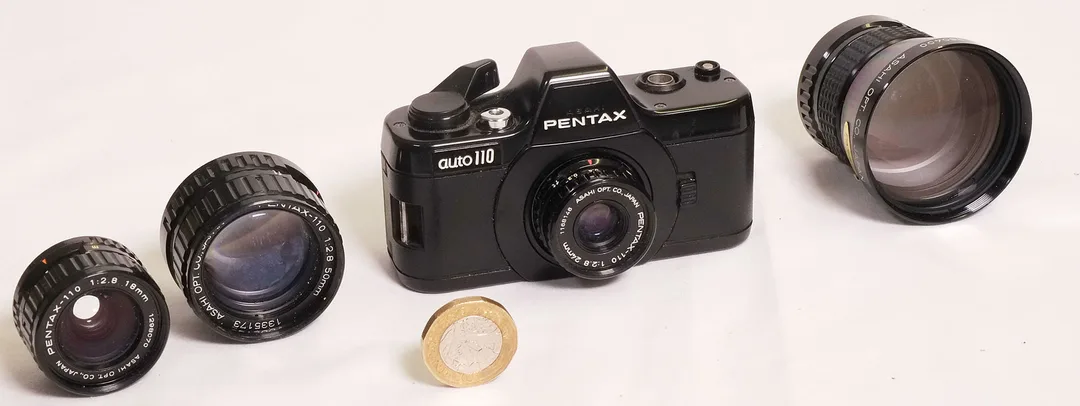
    The Pentax Auto 110 is a really tiny Single Lens Reflex camera from the late 1970s. It is a real camera, with quality interchangeable lenses, using 110 film - which is 16mm film in a drop-in cartridge. The image size is 17x13mm. I have the camera and four lenses in my cupboard, resting as it has been these many years, so I thought it would be worth getting it out and trying the lenses on my Fuji X-H1, which is APS-C sized. Actually Micro 4/3 would be a better match to the original Pentax 110 frame size, but never mind, we can crop down the resulting pictures from the larger 23.6x15.7mm APS-C frame. As we shall see, we need to!
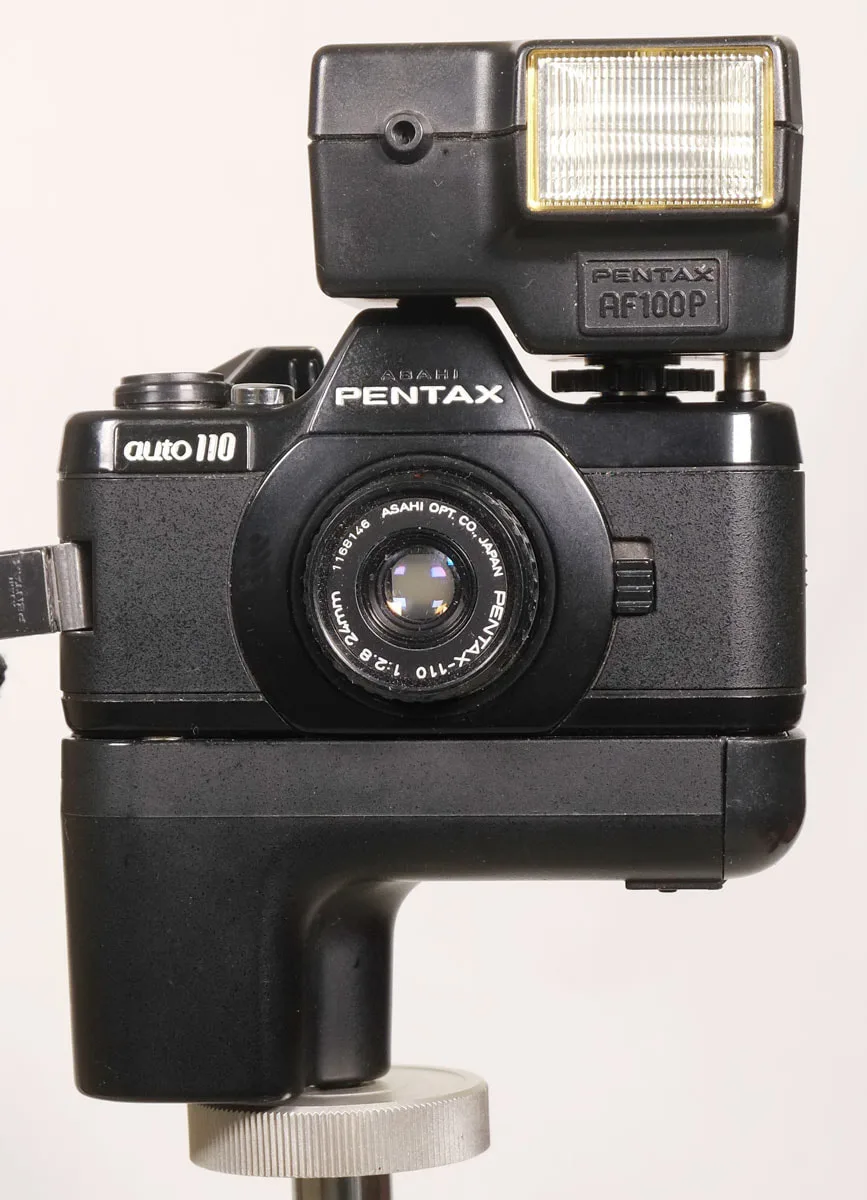
    The Pentax Auto 110 with standard lens, motor drive and dedicated flash
    Picture
    Picture
    Pentax 110 outfit - camera, dedicated flash, and four lenses; 18mm, 24mm, 50mm, and 70mm, with a British pound coin for scale.
    Some preparation is needed of course. The first step was to order a mount adaptor from China, which came in a couple of weeks for £11. Next, to deal with an issue arising from the design of the P110 (as I shall call it) - the lenses don't have a diaphragm. Aperture control is automatic using the camera's built-in meter, achieved by opening the shutter partially, to an extent required by the amount of light. The behind-lens shutter and aperture adjustment are combined.
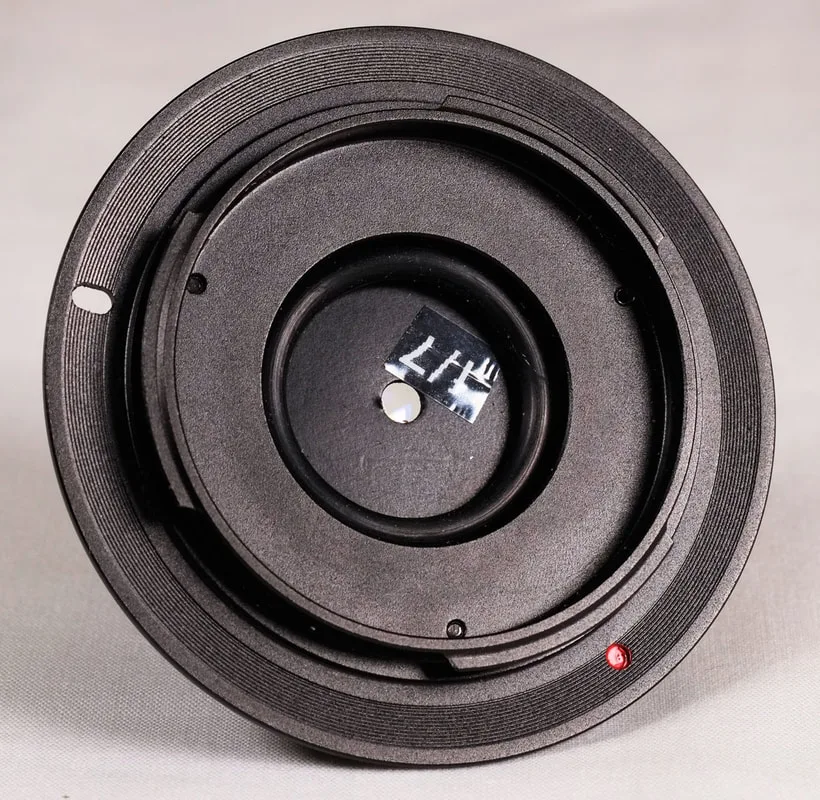
    The rear of the lens is 3mm forward of the shutter/diaphragm in the P110, so to stop down the lenses for a modern mirrorless digital body we wish ideally to put an adjustable aperture about 3mm back from the lens flange. Inspecting the Chinese adaptor when it came, I concluded that the easiest way is to make a set of aperture "washers" of a few sizes which can drop in the back of the adaptor, retained by a slightly oversized O-ring pushed into the hole. The aperture turns out to be about 4mm behind the lens, which should be good enough.
    Picture
    Rear view of the adaptor, with the f/7 "washer" retained by an O-ring
    Picture
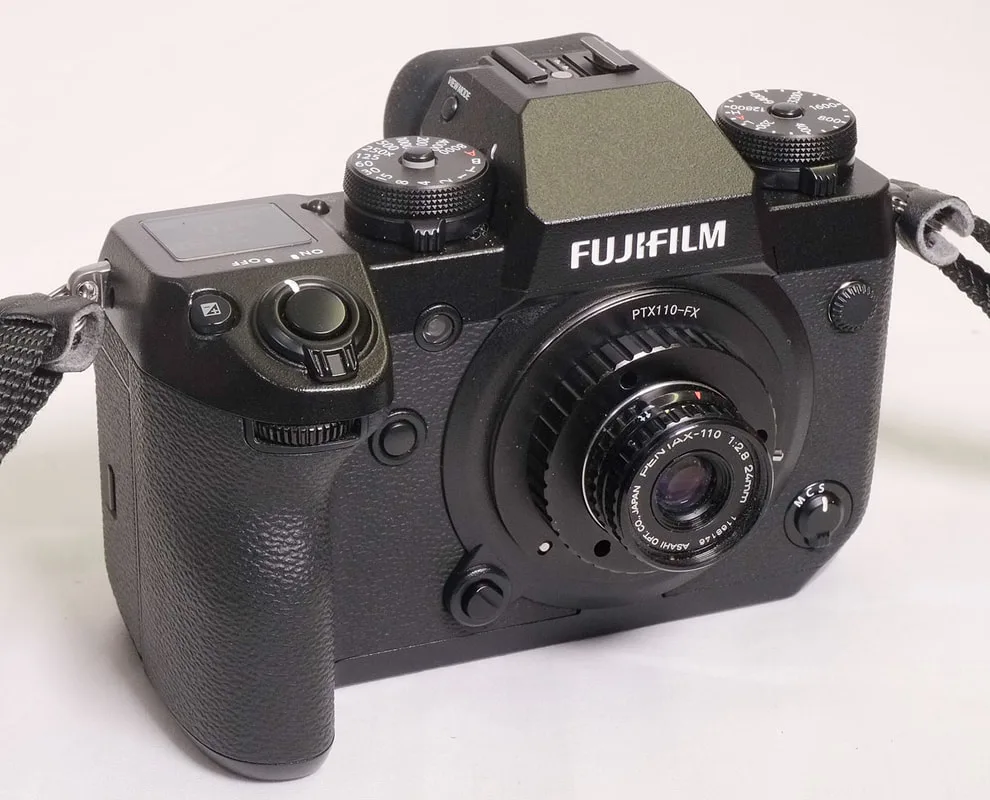
    The P110 standard lens on my Fuji X-H1. It looks comically small!
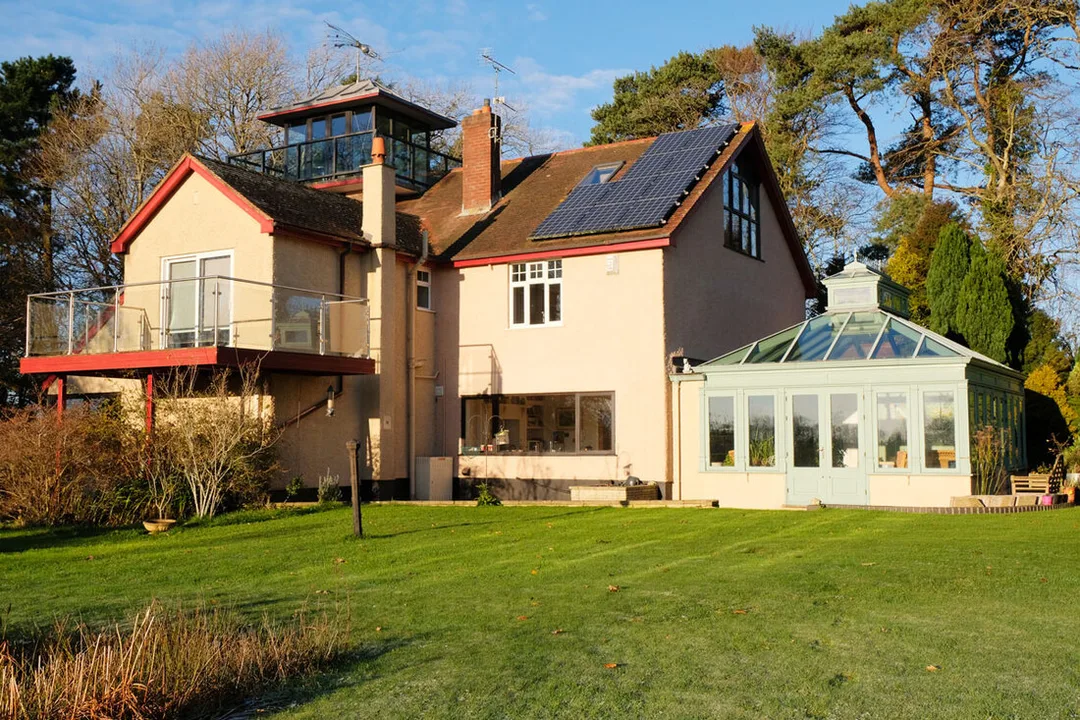
    So now on to trying out the P110 lenses on the Fuji camera. All the test pictures were taken of the same scene, on a tripod in the same position. We start with a picture of the scene taken with the Fuji's own lens - the 16-50mm zoom set at 24mm and f/7.1 - to give an idea of what a modern system makes of it:
    Picture
    And now with the P110 24mm standard lens, using the f/7 washer. The white box shows the crop corresponding to the Pentax's actual image size:
    Picture
    There is serious vignetting and loss of sharpness at the edges, but it barely extends into the area that the lens is intended to cover. We see the same thing with all the lenses, not surprisingly at its worst with the wide-angle 18mm.
    Expanding to 100% we can see that the modern lens (16-50 zoom at 18mm) and the Pentax 18mm perform very similarly within the intended coverage of the Pentax lens (both at f/7):
    Picture
    Fuji
    Picture
    Pentax
    The same can't be said of the 70mm Pentax lens, which seriously underperforms the Fuji 55-200mm zoom set at 70mm:
    Picture
    Fuji
    Picture
    Pentax
    At 50mm this problem goes away, with similar results from the Pentax and the Fuji zoom at its 50mm setting:
    Picture
    Fuji
    Picture
    Pentax
    The final comparison is with the standard focal length of 24mm (Pentax) and the 16-50 Fuji zoom set to about 24mm, which gives us:
    Picture
    Fuji
    Picture
    Pentax
    ... this time the Pentax is not quite up to modern standards, a little softer and less contrasty - but a respectable performance even so for a lens of its period.
    I conclude that the Pentax lenses, with the exception of the 70mm, are remarkably good for 40-year-old designs, and can stand up well to a comparison with modern expectations. Although not ideal for APS-C because of their limited coverage and the need therefore always to crop, they should do well on a Micro-4/3 digital body. I would avoid the (rare and expensive!) 70mm, and was particularly impressed with the tiny 18mm lens. Remarkable!